10 Best Coding Agents in 2026
Updated November 6, 2026
The short answer
For coding agents, the three strongest picks are HumanLayer, Conductor, and Mistle. HumanLayer suits engineering teams in large, complex codebases that want a shared design review before agents write code. Conductor suits teams that already pay for coding agent subscriptions and want to run several of them in parallel. Mistle suits teams that want background agents to handle issue triage, pull request review, and dependency maintenance from GitHub and Slack.
The shortlist, at a glance
Read the comparisons ↓ ConductorNot publishedEngineering teams that already pay for coding agent subscriptions and want to run them in parallel and collaborate on the same workspaces.
1code (21st.dev)Free to build, subDevelopers who already use Claude Code or Codex and want one visual app with isolated worktrees and background cloud agents.
 HumanLayerNot publishedEngineering teams working in large, complex codebases who want humans and agents to agree on a design before the agent writes thousands of lines of code.
MistleNot publishedEngineering teams that want to automate issue triage, PR review, and dependency maintenance from GitHub and Slack
 MorphNot publishedTeams building their own coding agents who need fast edit application and search inside the agent loop.
 Random LabsNot publishedEngineering teams with real codebases who want multi-step repo work, such as tracing auth flows or wiring up route changes, handled in one long-running session.
SynthFrom $0/mo (Free)Applied AI research teams that need search results tied to exact, versioned write-ups instead of loose summaries.
LotasNot publishedTeams working on data science or 3D projects who want to talk directly with the founders before committing to a tool.
 CompyleNot publishedEnvironmental consulting firms and Environmental Professionals who run a high volume of Phase I ESAs and want to take on more projects without adding staff hours.
 FirebenderDiscontinued Oct 2026Android engineering teams already working in Android Studio who want an agent that runs and tests its own changes.
About Coding Agents
Coding agents are AI tools that take a development task, such as a bug, a feature, or a review, and carry it through code. They explore a repository, make changes, run builds and tests, and hand the result back for human review. Some run in your terminal or desktop app, while others run in the cloud or on a schedule in the background.
The products on this list differ mainly in approach. Some are shared workspaces where a team plans and reviews agent work together, such as HumanLayer. Others run agents in parallel or in isolated sandboxes, such as Conductor and 1Code. Some are background automation tied to GitHub and Slack, such as Mistle, and some are infrastructure for teams building their own agents, such as Morph. Pricing models also vary, from published subscription tiers to pricing that is available only through a sales conversation.
The 10 best Coding Agents, compared
- Not published
1.Conductor
Best for: Engineering teams that already pay for coding agent subscriptions and want to run them in parallel and collaborate on the same workspaces.
- Pricing
- Not published
- Category
- Developer Tools
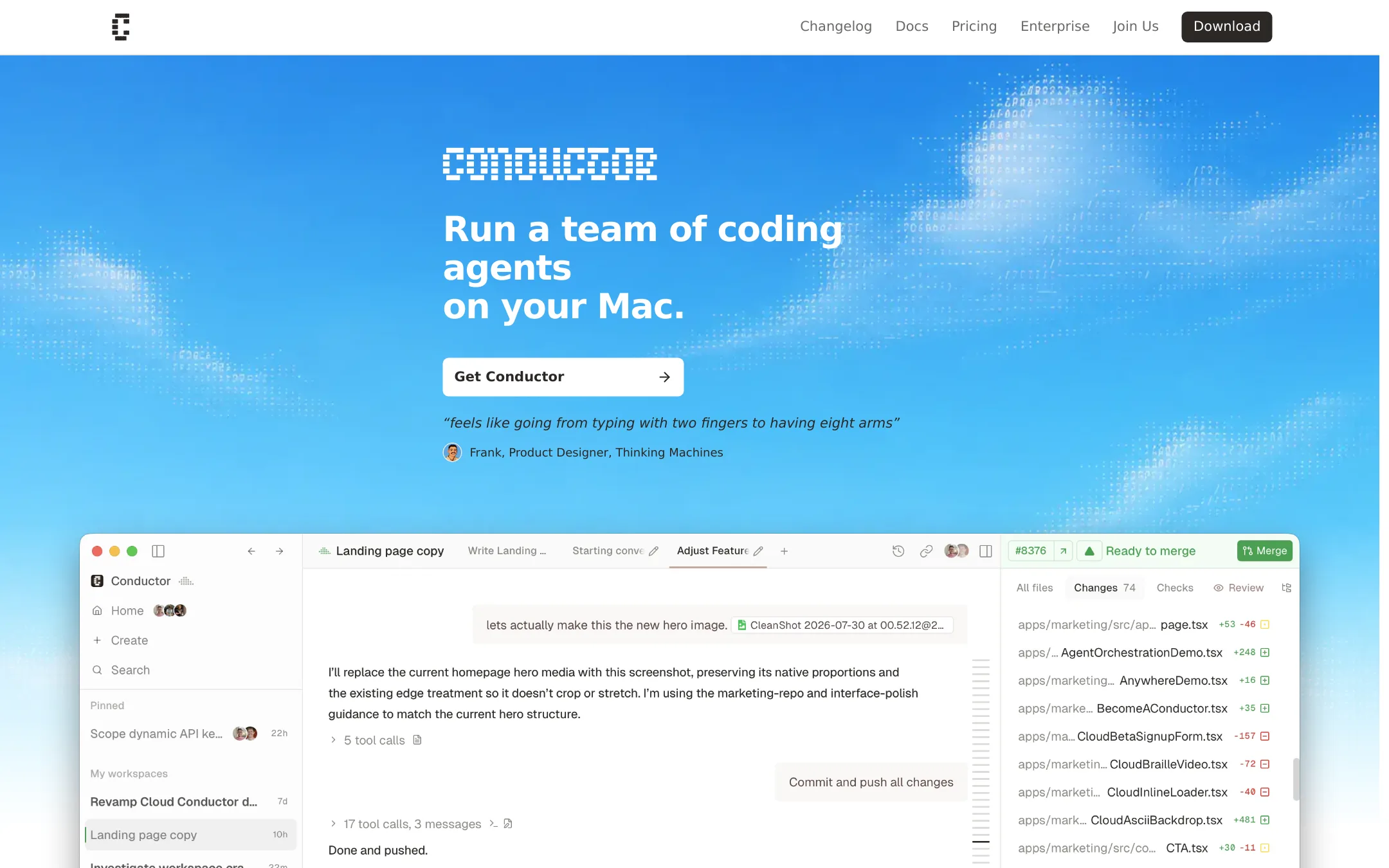
Conductor lets you run several coding agents at once, including Claude Code, Codex, Cursor, and OpenCode, inside isolated cloud sandboxes with your repos already set up. Teammates can join a shared workspace link and prompt agents together in real time. Conductor is also joining Meta, which is worth weighing for a long-term tool choice.
Where it is strong
- Runs several first-party coding agents in parallel
- Cloud sandboxes spin up in seconds and can run for hours
- Shared workspace links let teammates follow and prompt agents together
Where it falls short
- Pricing is not published on the site, so budgeting needs a direct conversation
- Cloud sandboxes depend on isolated microVM infrastructure, which may not suit teams needing fully local control
- Pricing:
- Pricing is not published on the site.
- Free to build, sub
2.1code (21st.dev)
Best for: Developers who already use Claude Code or Codex and want one visual app with isolated worktrees and background cloud agents.
- Pricing
- Free to build, sub
- Category
- Developer Tools
1Code is an open-source desktop client that runs Claude Code and Codex in one visual app, with diff previews and a built-in git client. Each chat runs in its own git worktree, so the main branch stays untouched while agents work.
Where it is strong
- Runs Claude Code and Codex side by side in a single desktop app
- Each chat runs in its own git worktree, keeping main branch changes isolated
- Open source under Apache License 2.0, and code stays on your machine in local mode
Where it falls short
- Automations and the API require a Pro or Max subscription
- Building from source needs extra setup steps, and skipping the agent binary downloads can leave agent features broken
- Pricing:
- Building from source is free, and pre-built releases plus background agents are available by subscribing at 1code.dev, though the listed price is not stated in the supplied facts.
- Not published
3.HumanLayer
Best for: Engineering teams working in large, complex codebases who want humans and agents to agree on a design before the agent writes thousands of lines of code.

- Pricing
- Not published
- Category
- Developer Tools
HumanLayer is a shared workspace where a team runs AI coding agents, keeps agent sessions, plan documents and code diffs in one place, and comments on designs before any code is written. Its six-phase workflow runs from clarifying questions through research, design, structure, plan and implementation, with checkpoints in between. It works with your existing Claude Code or Codex subscription through bring-your-own-key, so you are not billed separately per token.
Where it is strong
- Design docs are comment-driven and tied to the code, so feedback reaches the agents directly.
- Local daemon runs many agent sessions in parallel on a laptop, and cloud daemons keep work going after you close it.
- Bring your own Claude, Codex or other AI subscription, with SOC 2 Type II compliance and SSO/SAML on enterprise tiers.
Where it falls short
- Bringing your own skills and custom workflows is still in progress, so you are mostly limited to the built-in RPI and experimental workflows
- The strongest features, such as volume pricing, audit logs and on-prem or private VPC deployment, sit behind the Enterprise tier.
- Pricing:
- Pricing is not published on the site.
- Not published
4.Mistle
Best for: Engineering teams that want to automate issue triage, PR review, and dependency maintenance from GitHub and Slack

- Pricing
- Not published
- Category
- Developer Tools
Mistle runs open-source background agents that work across repositories, review pull requests, investigate bugs, and prepare code changes for human review. Agents can be triggered by GitHub events, Slack mentions, or cron schedules, and you can open any session to inspect or steer the work.
Where it is strong
- Work is attributed to the person who started it, through linked GitHub and Slack accounts
- Runs locally with Docker Compose, so the stack stays on your own machine
- Agents can be triggered by webhooks, app mentions, or scheduled cron jobs
Where it falls short
- Pricing is not listed, so cost comparison needs a direct conversation
- Local Docker setup means your team must run and maintain the stack itself
- Pricing:
- Pricing is not published on the site.
- Not published
5.Morph
Best for: Teams building their own coding agents who need fast edit application and search inside the agent loop.

- Pricing
- Not published
- Category
- Developer Tools
Morph is an inference service built for coding agents rather than a chat interface. It serves frontier open models such as Kimi K3 and GLM-5.3 through one OpenAI-compatible API, and adds specialized models for the agent loop: WarpGrep for search, Fast Apply for edits at 10,500 tok/s, and Compact for context at 33k tok/sec. Binance and Zo Computer are named as production customers on the site.
Where it is strong
- Fast Apply handles diff application at 10,500 tok/s, a step many agent builders find slow
- One OpenAI-compatible API covers frontier models and the specialized search, edit, and compaction models
- Self-hosting on-prem or in your cloud, with a 99.9% uptime SLA and SOC2 certification
Where it falls short
- Pricing is not listed publicly, so cost comparisons require a sales conversation
- It is infrastructure for building agents, so it does not suit someone who just wants a ready-made coding assistant
- Pricing:
- Pricing is not published on the site.
- Not published
6.Random Labs
Best for: Engineering teams with real codebases who want multi-step repo work, such as tracing auth flows or wiring up route changes, handled in one long-running session.

- Pricing
- Not published
- Category
- AI & Machine Learning
Slate is a terminal coding agent from Random Labs that keeps a task alive across exploration, implementation, builds, and test failures instead of starting fresh with each prompt. It can split independent research and coding work into parallel threads and bring the useful results back to the main session. Its built-in context compaction is meant to keep the original goal in view while it reads a large codebase.
Where it is strong
- Keeps a task running across exploration, builds, and test failures
- Runs parallel research and coding threads and merges results back
- Installs as a CLI and works directly in your terminal
Where it falls short
- Still in open beta, so the product may change
- Pricing is not published, so cost is hard to judge before trying it
- Pricing:
- Pricing is not published on the site.
- From $0/mo (Free)
7.Synth
Best for: Applied AI research teams that need search results tied to exact, versioned write-ups instead of loose summaries.

- Pricing
- From $0/mo (Free)
- Category
- AI & Machine Learning
Synth runs cloud agents for applied AI research and searches reviewed research, with each result citing the exact write-up version it came from. Its Index search has FAST and DEEP modes, so you can trade speed for depth. Swarms, the hosted research agent runs, is listed as coming in a later release.
Where it is strong
- Each search result cites the exact write-up version
- FAST and DEEP search modes for different speed and depth needs
- Prepaid credits never expire
Where it falls short
- Swarms hosted agent runs are not yet available and are coming in a later release
- Usage is metered, and DEEP searches cost more per query, which can add up for heavy users
- Pricing:
- Plans run $0 Free with $10 weekly usage, $20/month Standard with $60 weekly usage, and $200/month Max with $300 weekly usage, with extra usage drawn from prepaid credits at $0.01 each.
- Not published
8.Lotas
Best for: Teams working on data science or 3D projects who want to talk directly with the founders before committing to a tool.

- Pricing
- Not published
- Category
- AI & Machine Learning
Lotas describes itself as an AI company focused on data science and 3D applications. The site lists co-founders Jorge Guerra (CEO) and Will Nickols (CTO) with direct email contacts. Public product detail is thin, so it is hard to judge its coding agent capabilities from the site alone.
Where it is strong
- Direct email access to both co-founders, the CEO and CTO
- Focus on data science and 3D applications
- Listing is not verified, so buyers should confirm details directly with the team
Where it falls short
- The site offers little public product information beyond a contact page
- Pricing is not disclosed, so cost has to be confirmed by email
- Pricing:
- Pricing is not published on the site.
- Not published
9.Compyle
Best for: Environmental consulting firms and Environmental Professionals who run a high volume of Phase I ESAs and want to take on more projects without adding staff hours.

- Pricing
- Not published
- Category
- Developer Tools
Compyle automates the desk work behind a Phase I Environmental Site Assessment, pulling historical aerials, Sanborn maps, city directories, and regulatory records and drafting report sections in the firm's own template. Every claim links to the source record it came from, and the EP reviews and approves each section before anything ships. Its founders previously built AI compliance systems at Hadrius (YC W23), which gives the product a track record in audit-grade automation.
Where it is strong
- Data packages arrive the same day, without the 3-10 day wait for EDR or ERIS.
- Each finding is linked to its source record, so reviewers can check claims against raw data.
- Drafts follow the firm's own report template, and the EP approves every section before sign-off.
Where it falls short
- Built only for environmental due diligence, so it is no use for other consulting or compliance work.
- The site does not publish pricing, so you will need to request a demo to learn the cost.
- Pricing:
- Pricing is not published on the site.
- Discontinued Oct 2026
10.Firebender
Best for: Android engineering teams already working in Android Studio who want an agent that runs and tests its own changes.

- Pricing
- Discontinued Oct 2026
- Category
- Developer Tools
Firebender is an agent built for Android Studio that writes features, runs them in the emulator, and fixes problems on its own. It uses Android Studio's own debugger and logcat, and it can turn a Figma link into Jetpack Compose code that fits your existing design system. It is a credible pick for Android teams, though new subscriptions are closed.
Where it is strong
- Tests its changes in the Android emulator and fixes failures itself
- Converts a Figma link into Jetpack Compose that uses your design system
- SOC 2 Type II and ISO 27001 certified, with zero data retention
Where it falls short
- New subscriptions are closed and the service ends October 31, 2026
- Only useful if your team builds in Android Studio and IntelliJ
- Pricing:
- New subscriptions are disabled and the service ends October 31, 2026, so no plan can be bought today.
How to choose Coding Agents
Start with pricing structure. Several products on this list do not publish prices, so you will need a direct conversation to budget for them. Others use published subscription tiers or ask you to bring your own model subscription, which changes how you count costs.
Check who the product is built for. A desktop client suits individual developers, while a shared workspace suits a team reviewing designs together. Infrastructure products such as Morph suit teams building their own agents, not those who want a ready-made assistant.
Confirm integrations before you commit. Background agents such as Mistle depend on GitHub and Slack, and mobile tools such as Firebender depend on Android Studio. A product that fits your stack will save setup time.
Review data handling and compliance. Some listings mention SOC 2 Type II, ISO 27001, SSO and SAML, zero data retention, or the option to run the stack locally. Check which of these apply to the tier you plan to use, since several of the strongest features sit behind enterprise plans.
Look at support and contract terms. Ask about uptime commitments, deployment options, and what happens if a product changes or ends. Firebender, for example, has closed new subscriptions and will end service on October 31, 2026, which is a reason to check a product's status before you rely on it.
FAQ
Questions about Coding Agents
What is a coding agent?
A coding agent is an AI tool that carries out development tasks, such as fixing bugs, building features, or reviewing pull requests. It explores a codebase, makes changes, runs builds and tests, and returns the result for a person to review. Some run in a terminal or desktop app, while others run in the cloud or in the background.
Which coding agent is best for a team?
HumanLayer suits engineering teams working in large codebases who want humans and agents to agree on a design before code is written. Conductor suits teams that already pay for coding agent subscriptions and want to run them in parallel. Mistle suits teams that want background agents to handle issue triage and pull request review.
Do these products publish their prices?
Most do not. Pricing is not published on the site for Conductor, HumanLayer, Mistle, Morph, Random Labs, Compyle, and Lotas, so you will need to contact the vendor to budget. Synth lists its plans publicly, and 1Code offers a subscription for some features, though its listed price is not stated in the supplied facts.
Can I run a coding agent on my own machine or infrastructure?
Some can. 1Code runs locally in local mode and is open source under Apache License 2.0. Mistle runs locally with Docker Compose. HumanLayer offers local daemons for running many sessions on a laptop, and Morph supports self-hosting on-prem or in your own cloud.
Is any product on this list no longer available?
Yes. Firebender has closed new subscriptions and will end service on October 31, 2026, so it cannot be bought today. Synth's hosted Swarms research agent runs are also not yet available and are listed as coming in a later release.
Last updated November 6, 2026.